About the assessment lifecycle

Abstract

Learn how assessments move through their lifecycle in Moody's for Compliance, from creation through completion, including how workflow block names and outcomes are used to track progress and decisions.

An assessment in Moody's for Compliance evaluates an entity against a defined set of rules and workflow stages. It provides a structured way to guide work, make decisions, and record results in the platform.

Every assessment follows the same core lifecycle. You can configure the terminology used to match your processes, but the underlying flow stays the same.

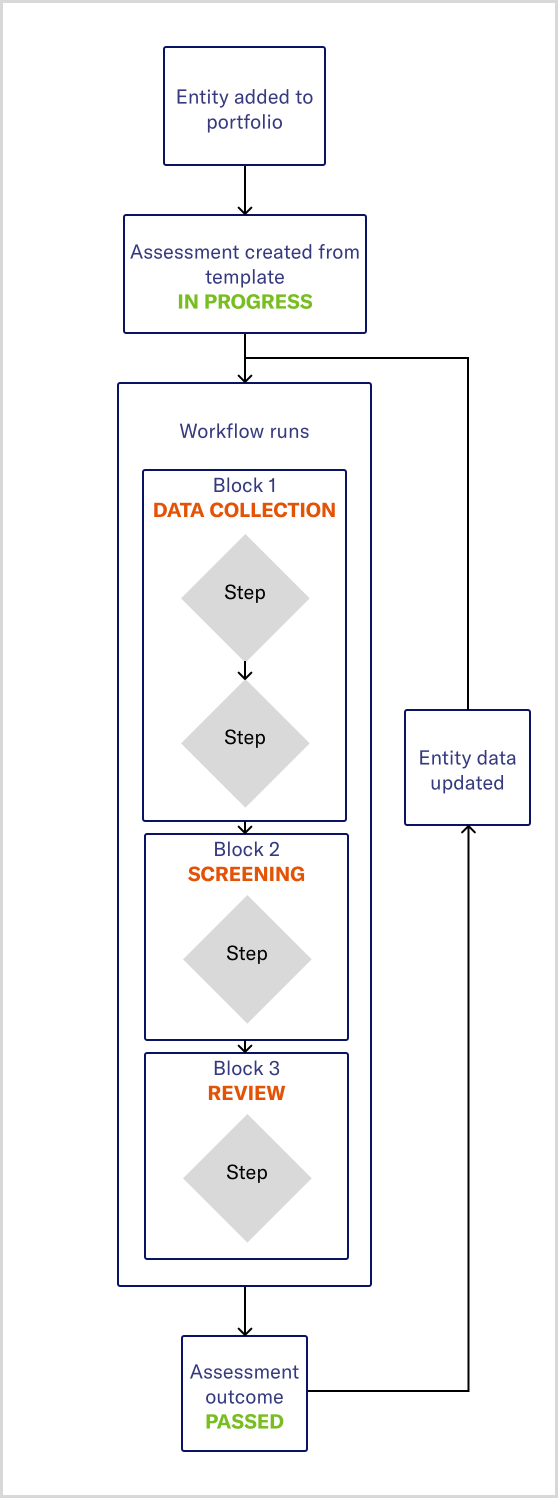
Overview of the assessment lifecycle

At a high level, an assessment moves through the following stages:

  1. Assessment creation

    You select an entity, and start an assessment from a predefined template.

    When the assessment is started, it displays the starting status defined by your institution, for example, In progress. The assessment lifecycle begins at this point.

    When an assessment is created, the status indicator shows the starting status defined by your institution (for example, In progress).
  2. Workflow initiation

    Starting the assessment begins its workflow.

    The workflow defines how the assessment progresses and is made up of a series of blocks, each representing a distinct phase of the assessment.

  3. Block execution and progress

    As the workflow runs, it moves through its blocks in sequence, following the path determined by the work completed and decisions made along the way. Each block groups together related work, such as data collection, screening, or review.

    The platform displays the current block name, so you can see which phase of the assessment is active.

  4. Steps and tasks within blocks

    Each block contains one or more steps that run in order.

    Automated steps run immediately without user input. Manual steps pause the assessment and generate tasks that require a user to review information or provide input.

  5. Assessment outcome

    When the assessment workflow completes or is explicitly canceled, Moody's for Compliance sets an assessment outcome, such as Passed, Failed, or Canceled. This outcome reflects the assessment result at that point in time.

    The same status indicator updates to show the assessment outcome when the workflow reaches completion, and may change again if the assessment is re‑evaluated.
  6. Re-evaluation and lifecycle continuation

    If the entity's underlying data changes after an outcome is reached, the assessment may be reviewed or re-evaluated.

    In this case, the workflow resumes from the relevant point and continues through the remaining blocks. Based on updated data or decisions, the workflow may follow a different path, run additional blocks, or generate new manual tasks. This may result in a new outcome.

Assessment_lifecycle.svg

Each assessment runs independently, even when multiple assessments exist for the same entity.

Assessment outcomes

An assessment outcome represents the current result of an assessment, such as Passed, Failed, or Canceled. Your institution defines and manages outcomes as part of its configuration.

When an assessment workflow reaches a defined endpoint, Moody's for Compliance sets the corresponding outcome. If you cancel an assessment, the workflow stops, and the assessment is assigned the configured canceled outcome for its template.

Outcomes help you understand the status of an assessment and support decision-making based on the latest available information. If new information becomes available, the assessment can be re-evaluated. Re-evaluation may resume the workflow, generate new tasks, and potentially update the outcome to reflect the most current view.

Additional information