About entity search
Learn how entity search works, including data sources, result matching, result views, and how entity details support identification and portfolio actions.
The platform search brings together Moody's curated data and international business registers to help you find, identify, and compare entities. Search also provides options to sort and filter results and review entity details before deciding whether to add an entity to your portfolio.
Data sources
Search results contain entities from two main data sources.
Moody's curated data: Data for over 500 million global companies covering information like firmographics, financials, beneficial ownership, corporate hierarchies, and directors.
Live register data: Real-time entity data from a network of commercial registers and financial authorities representing over 200 countries.
Search bar
Start typing in the search bar from anywhere in the platform to find entities instantly.
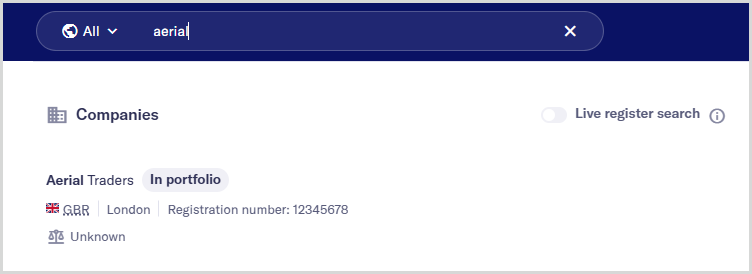
As you type, suggested matches appear, helping you quickly identify relevant entities from Moody's curated data. You can also narrow results by country and include real-time results from register data when available for your selected region using the Live register search toggle.
Search results
Initial search results include up to five entities from Moody's curated data that most closely match your search terms.
Each result includes entity details, for example, industry, entity identifiers, and legal status, to help you spot the right entity.
Entities that are already in your portfolio are clearly marked with an In portfolio label.
To see more results or compare entity data, press or select to open the search results table. From there, you can sort and filter search results and choose which columns to display in the table.
Entity details
Select an entity name from the search results to open its details. These details include key information like ownership, officers, and financials, which helps you focus on relevant entity details.
The entity details view also supports portfolio actions.
For entities already in your portfolio, you can access notes, audit details, and data configuration.
For entities outside your portfolio, you can review available data and add them to your portfolio.
These details help you decide which entities to track and manage in your portfolio