Remove an entity from your portfolio
Learn how to remove an entity from your portfolio, including any associated assessments, tasks, and data overrides.
Your portfolio contains the entities your organization assesses and monitors. In some cases, you may need to remove an entity, for example, if it's no longer relevant to your work or was added in error.
Removing an entity deletes it from your portfolio, along with any associated assessments, tasks, and data overrides. If you choose to add the entity back to your portfolio in the future, it is processed as a new entity and may incur additional fees.
To remove an entity from your portfolio and permanently delete any associated data:
In the Portfolio view, select the entity name to open the entity page.
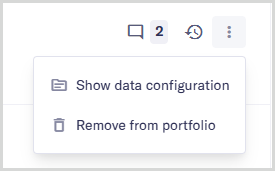
In the title bar, select the More options menu item.

Select .
In the confirmation dialog, select to continue.
The entity is removed from your portfolio, including any assessments, tasks, and data overrides.